Install the AI model into your computer, and disconnect the Internet for free.
The way most people use AI is: open a web page, log in, pay monthly, and connect to the Internet to use it. But in fact, you can download a large model close to GPT and run it locally on your computer-it is free, it can be used offline, and data will not be leaked out. The threshold is lower than expected: an ordinary computer with 16G memory (even without a discrete graphics card) can run a 7B-level model, and it is enough for daily Q & A, translation, email writing, and code changes. Tools are also as simple as "one line of command" or "a few clicks of the mouse": Olama is used for command lines, and LM Studio's graphical interface is used for those who are afraid of commands. This article explains the whole story of running AI locally from the beginning-why it is worth doing, how big a model can your computer run, how to install it, which model to run, and its real limitations. You can install one after you finish reading it.
Let me ask you a question first: How do you use AI?
The high probability is-open the Doubao or ChatGPT webpage, log in, connect to the Internet, and ask questions. If you use it too much, you have to open a membership.
But there is one thing many people don't know: You can download a large model with capabilities close to GPT directly to your computer and run it. There is no need to connect to the Internet, no need to pay, and the data is all local and no one can see it.
Sounds like something for geeks? Two years ago, it was true-I had to install a bunch of CUDA, compile it for a long time, and go crazy about reporting errors. But now it's different. Running a large model locally has been simplified to the level of "one line of command" or "a few clicks of the mouse", which can be done by an ordinary computer.
In this article, I'll tell you everything from the beginning: why it's worth installing, how big your computer can run, how exactly to install it, which model to run, and what its real limitations are. After reading it, you can install one yourself.
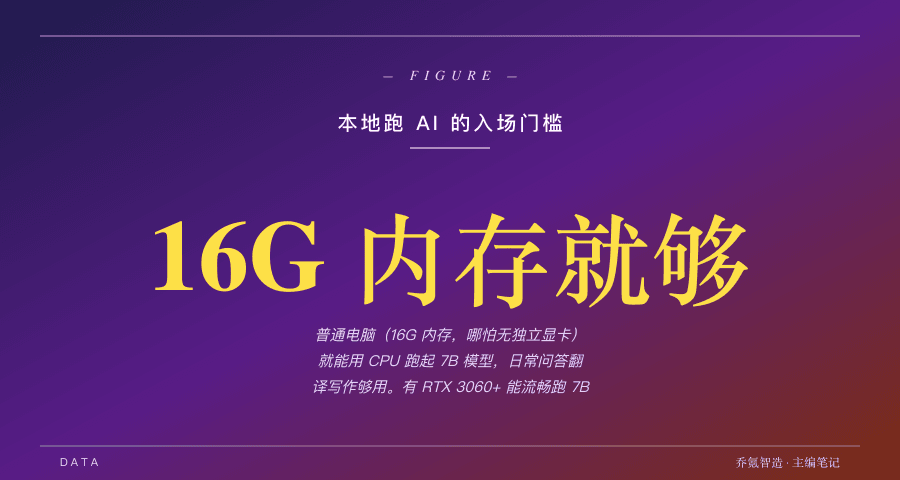
first explains why it's worth the trouble
Run AI locally to solve what three cloud AI cannot give you.
First, data will not be leaked out. Every word you ask the cloud AI and every document you upload will be sent to the other party's server. If you have to deal with company codes, contracts, financial data, private information, there are concerns in itself. The local model runs on your own computer, and not a single byte of data goes out of the door.
Second, it can be used even if the network is disconnected. On airplanes, high-speed trains, and places with poor networks, cloud AI will be directly useless. The local model does not rely on the network, and can still write code, check data, and translate when disconnected.
Third, unlimited use at zero cost. If cloud AI is used too much, it costs money. It is billed by token, and heavy users will cost tens of hundreds of yuan a month. Download the local model once, and then run it without spending a penny.
Among these three points, as long as one of them hits you, local running AI is worth installing.
How big can your computer run?
This is the most critical and easiest part to dissuade people. It's actually not that scary, I'll explain it clearly in plain Chinese.
Models are large and small, measured by "parameter quantities". For example, 7B is 7 billion parameters. The bigger the model, the smarter it is, but it also eats more memory and video memory.
There is a simple conversion: After the model is "quantified" compressed (you don't need to understand the principle, just know that this is standard), running a 7B model requires about 4 to 8GB of video memory, or enough memory. corresponding to your computer--
Old computers/ordinary notebooks without discrete graphics cards : As long as you have 16G of memory, you can run the 7B model with pure CPU. Slow down, but it is enough for daily Q & A, translation, writing emails, and summarizing articles. This is the situation for the vast majority of people, which means that the computer you are using now has a high probability of running.
With discrete graphics cards (such as RTX3060 and above): Models that can run 7B to 14B more smoothly, the speed is significantly faster, and the experience is close to online AI.
High configuration (4090 with 24G memory, or Mac with unified memory of more than 64G): It can run 32B models, and the answer quality is close to GPT-4 level. This is the ceiling that personal computers can reach.
Let me give you a real measured data and feel it: a machine with RTX3060 (12G memory) and 64G memory runs the 35B model of Qwen3.5 at a speed of about 14 words per second, and you can accept both thinking and answering.
So the conclusion is-don't be intimidated by the word "big model". You don't need a top-of-the-line computer. An ordinary machine with 16 GB of memory is the ticket for local AI.
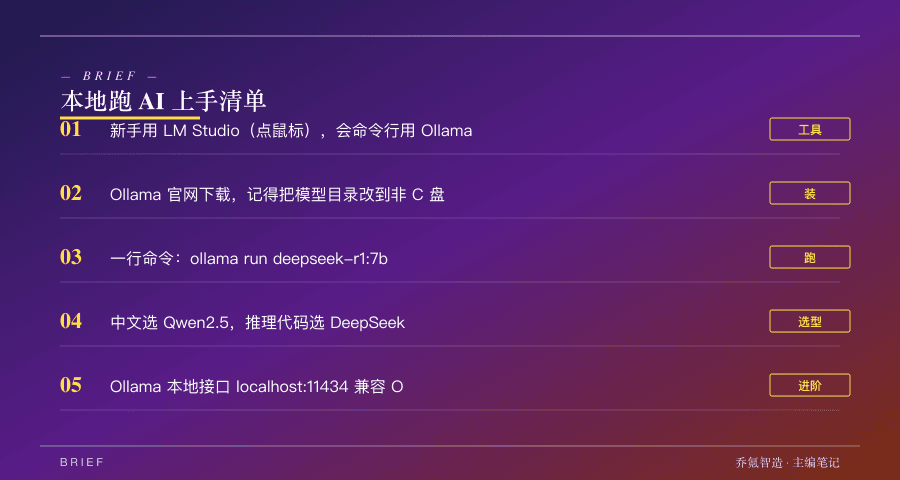
two tools, choose one according to your habits
When running AI locally, there are only two mainstream tools, and the difference is very simple.
Ollama--Command line tool for people who are not afraid of typing commands. Its advantages are that it is lightweight, clean, and can be called by various programs.
LM Studio--Graphical interface tool, suitable for people who have headaches when they see the dark command line. Clicking the mouse the entire time is like installing ordinary software.
If you have never touched the command line at all, use LM Studio directly. If you have written a few lines of code or are willing to learn it, Ollama is faster. Let me talk about both of the starting steps below.
Ollama 3 Get started in three steps
The first step is to install. Go to the official website ollama.com, click Download, download the installation package corresponding to your system (supported by both Windows / Mac / Linux), and double click to install it.
Here is an important reminder: Before installing it, change the model download directory to a D drive or other large-capacity drive in the settings. Because model files can often be tens of gigabytes to tens of gigabytes, placing the C disk by default can easily plug the system disk. Many novices will step into this step.
The second step is to build the model and run it. Open the terminal and type a line of command, such as running DeepSeek's 7B model:
ollama run deepseek-r1:7b
It will be downloaded automatically the first time (about 4.7G, wait once, and then open in seconds). An input prompt will appear after the game, and you can chat with it by typing directly. If you want to quit, type/bye.
The third step is to change the model as needed. Several commonly used ones-qwen2.5:7b (strong in Chinese, you can run with 4G video memory), llama3.1:8b (internationally common), deepseek-r1:7b (strong in reasoning and code). For large memory, use 14b and 32b, and for small memory, use 1.5b and 7b. One sentence: ollama list depends on what you install, ollama rm 模型名 deletes what you don't want.
LM Studio is easier
LM Studio has a full graphical interface. After installing it, search the software for the model you want (such as Qwen, DeepSeek), click download, and chat directly in the conversation window after downloading. It is almost the same as using the web version of AI, but it runs locally.
The only thing to note is: If your model is large and the computer configuration is average, the software can adjust the memory allocation and inference engine (CUDA is still pure CPU), and if you can't run, change to a smaller model.
For pure novices, I suggest starting from LM Studio, and then trying Ollama when you have a feeling for it, you can try Ollama.
Which model does ## run? Give you direct advice
Don't worry, choose according to the scene--
Daily use of Chinese (question and answer, translation, writing): Choose Qwen 2.5(the open source version of Tongyi Qianwen), Chinese is one of the best among all open source models.
Reasoning and writing code: Choose the DeepSeek series, with strong logic and coding skills.
The configuration is low, and I just want to try it first: start from the smallest 7B quantitative version, and change to the larger version when it can run.
High configuration and want the best effect: Go to Qwen-32B , which is the most cost-effective choice for personal computers. The effect is close to GPT-4. It can be driven by a graphics card with 24G memory or a Mac with 64G memory.
, but its limitations must be clarified
I don't want to portray local AI as omnipotent. It has a few real shortcomings, you need to know.
First, small models will become stupid. Small models that can be run on ordinary computers are more likely to "talk nonsense" than large models in the cloud because they have few parameters and have been compressed (professionalism is called hallucination), and sometimes they will be inconsistent. There is only one way to alleviate it: try to run a bigger model as far as your computer can handle it.
Second, the speed may be slow. Low-profile computers run on CPU, which may slow down to two or three words per second, and the impatient person will not be able to stand it. It will be much faster with a discrete graphics card.
Third, knowledge is not updated. The local model is "frozen" at the moment of its training. Ask it for the latest news and today's stock price, but it doesn't know. This real-time information also relies on networked AI.
So the cleverest usage is not to "replace cloud AI with local AI", but to use two combinations: hand over sensitive, offline, and high-frequency repetitive tasks to the local area; hand over tasks that require the latest information and the most powerful capabilities to the cloud.
What does ## mean to you
Falling to specific actions--
If you are an ordinary user, worried about privacy, or often using AI in places where there is no Internet: You can install LM Studio tonight, use the next Qwen 2.5 7B model, and experience "AI in your computer." You can run through in half an hour.
If you are a developer or a heavy user: Ollama is worth installing. It provides a local interface that is fully compatible with OpenAI (address is localhost:11434), which means that if you change the address pointing to the cloud in the code to this, the same set of code can be cut between the local and the cloud at will-local debugging, running batch tasks, and not spending a penny.
If you are a company or a team and have data compliance requirements: local deployment is almost a must. Deploy the model on the intranet, and sensitive data will never leave the company.
Last
Most people's understanding of AI still stops at "opening a web page, logging in, paying, and connecting to the Internet."
But the issue of running large models locally is changing this default setting. With an ordinary computer, a free tool, and in half an hour, you can have an AI that belongs entirely to you, does not connect to the Internet, does not spend money, and does not spread data.
It is not to replace the powerful AI in the cloud, but to give you another choice-to have a backup brain that is on call and no one can control when you need privacy, offline, and save money.
This choice used to be an option that only geeks could afford. Now, the threshold is so low that anyone willing to spend half an hour can cross it.
Whether you want to pretend or not depends on you. But at least now you know that the door is open.