Why are AI programming tools so much worse for the same model?
When choosing a programming tool, the first sentence everyone opens their mouths is almost "Which model does it connect to?" But almost all mainstream programming agent models can be changed-Cursor can cut Claude/GPT/your own Composer, Cline lets you bring your own key to pick up more than 30, and Tencent CodeBuddy has built-in Mixed Origin, DeepSeek, GLM, Claude, GPT, and Gemini. The model layer is being leveled out. Then why are Claude Code and Cursor two completely different things? This article reviews the nine programming agents on the market (Claude Code, Codex, Cursor, Antigravity, Windsurf, Cline, Byte Trae, Tongyi Lingcode, Tencent CodeBuddy) and breaks them down into five parts to explain clearly: how to feed the context, what hands and permissions to give, how to form multiple agent teams, what form they grow into, and whose ecology they are tied to. The conclusion is that the model gives the brain, and everything outside the brain is engineering, and the further we go, the only thing that can widen the gap is engineering.
When selecting a programming tool, I found that everyone almost always had the same question: "Which model is it connecting to?"
The subtext of this question is that the model determines everything. If you connect Claude, you will be strong, if you connect GPT, you will be strong, and if you connect a small domestic model, you will be weak.
But as long as you really install all these tools, you will find that this assumption is untenable.
Because of the current mainstream programming agents, almost all models can be changed. Cursor can cut Claude, GPT, and its own Composer;Cline simply lets you bring your own key and pick up more than 30 models at will; even the domestic Tencent CodeBuddy has all the built-in models list, so you can use whichever you want.
The model layer is being leveled out.
Then the question arises: If everyone uses the same brain, why are Claude Code and Cursor two completely different things? Why do you also pick up Claude, some tools are like a reliable colleague, and some are like an intern who will be of no help?
I looked through all the well-known programming agents on the market-Claude Code, Codex, Cursor, Google's Antigravity, Windsurf, open source Cline, plus domestic byte Trae, Ali Tongyi Lingcode, and Tencent CodeBuddy-to find out: Leaving aside the model, what is the difference between them?
Let me start with the most surprising point in the conclusion: the gap between the model itself is actually not as big as most people think.
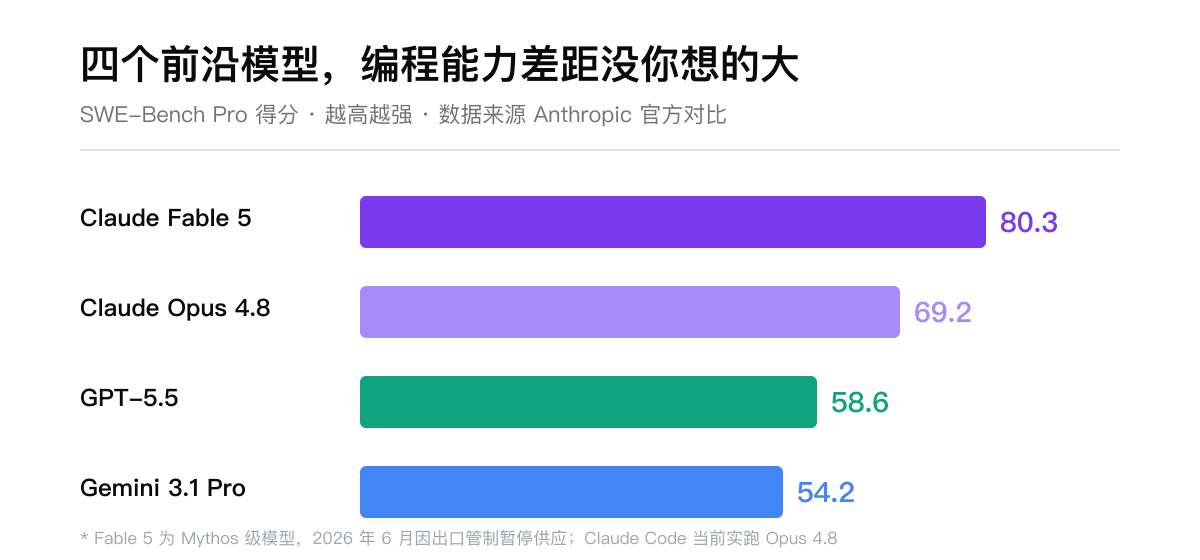
This is the score of several cutting-edge models on SWE-Bench Pro, a list that specializes in measuring real programming tasks. The strongest Claude Fable 5 is 80.3, and the weakest Gemini 3.1 Pro is 54.2. There is a difference of 26 points between the strongest and weakest. It sounds a lot, but you have to know that this is the gap between "the strongest" and "not bad", not the gap between "can be used" and "cannot be used". When writing code every day, there is no order of magnitude difference in the experience these models give you.
(One more thing: Fable 5 was the strongest model released by Anthropic in early June, but it was suspended a few days later due to export controls. Now Claude Code actually runs Opus 4.8. This matter itself also shows that the model changes too quickly, and the product that binds a model is passive.)
The brain is similar. Then why is the product so much worse?
I broke it down into five pieces to see it. Let me give you a summary of the overall situation first, and let me talk about it one by one.
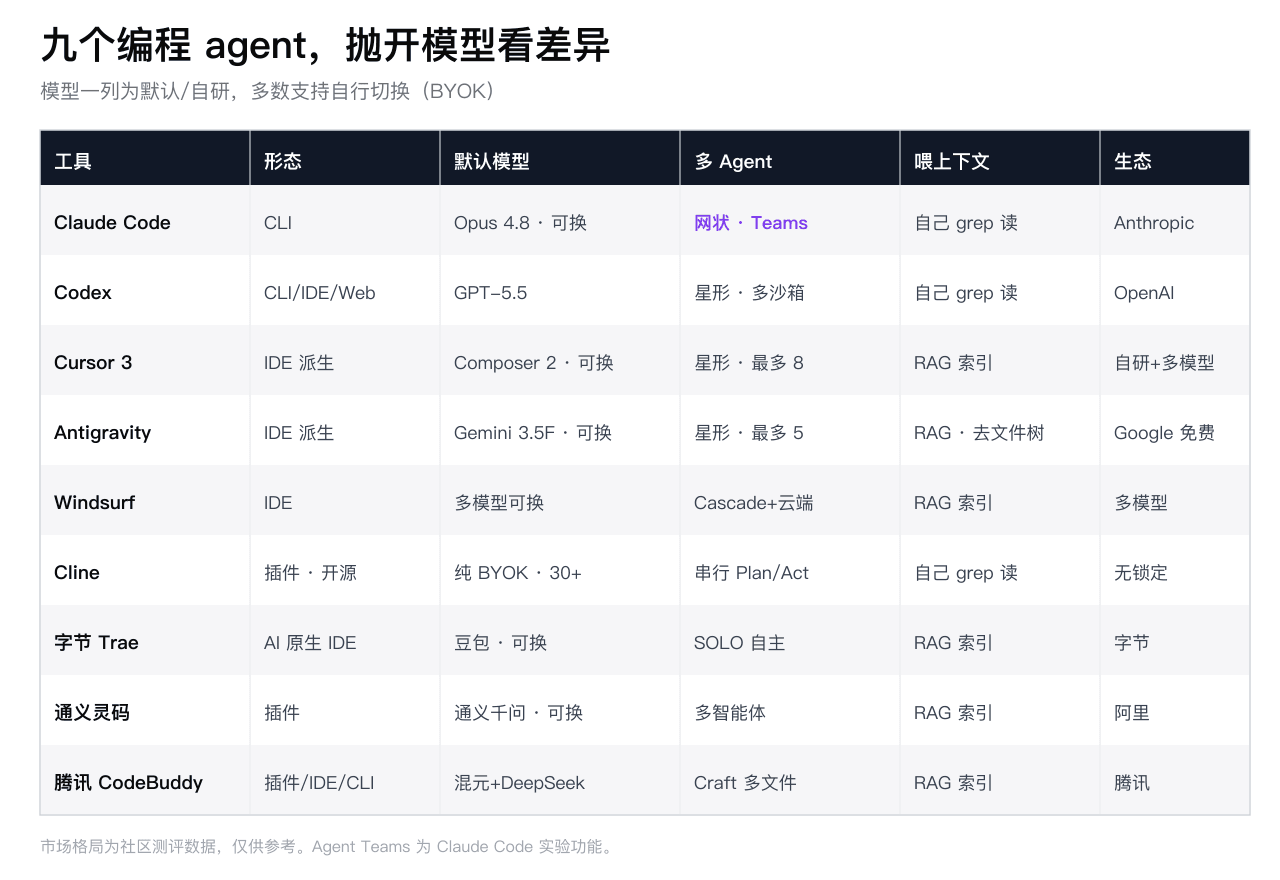
Just take a look at this table to get an impression. Among the five dimensions below, I will pick the biggest differences in each piece and tell you.
1. How does it feed your code to the model
This is the first and most underestimated watershed.
No matter how big the context window of the model is, it cannot accommodate a project with hundreds of thousands of lines. So every tool has to solve a problem: the user asks, what code should I put into the model?
There are two roads here.
One way is to "build indexes in advance." Cursor, Windsurf, and most domestic tools follow this path. They will chop up your entire warehouse and make it into a vector index (or RAG). When you ask a question, it will first retrieve the most relevant pieces of code from the index and then feed them to the model. The advantage is that it is fast, but the disadvantage is that it may not be accurate-it is based on "semantic similarity", not based on a true understanding of your code structure.
The other way is to "let the agent flip it himself." Claude Code and Codex follow this path. They do not have pre-indexed, but like a human programmer, grep on site, read files, and scroll through the call chain layer by layer. Slow down, but the thing you turn up is often more right, because it is looking for your specific problem.
Antigravity is more radical on this matter. It simply weakens the traditional document tree, allowing you to work around "tasks" rather than "documents", with the agent organizing the context at the bottom. This is a bold design. I used it myself. People who are used to the document tree will feel uncomfortable in the past few days, but it does represent a new idea.
Which way is better? I thought for a long time, but there was no standard answer. The index is fast but rough, and the index is accurate but slow. This is precisely the first reason why the same model is different and the experience is different-the materials fed in are different, and no matter how smart the model is, it is useless.
2. What method should I give it and how much authority should I give it?
The model itself can only produce words. Whether you can change files, whether you can run commands, whether you can open a browser and test yourself-these "hands" are given by the tool, not the model.
The difference in this area is also very big.
Cline's approach is the most restrained: it is divided into two models: Plan and Act. First, you are shown how it plans to do it (Plan), and it will only do it (Act) after you nod, and you need to approve every step. This is very friendly to people who don't trust AI to change code indiscriminately. The price is being slow and keeping an eye on.
Antigravity and Cursor give the agent a built-in browser. After writing, the front-end can open the page itself to see the effect, take screenshots, and even record screens for you to see. It has been verified. This step is critical-it connects "writing" with "verifying whether you wrote it correctly."
Both Codex and Tencent CodeBuddy emphasize isolation sandboxes: agents run commands in an isolated environment, and if they run bad, they will not affect your own machine. This is pushing the agent in the direction of "daring to let go and let it do it on its own."
You see, for the same model, some tools only allow it to print words for you to stick it, while some tools equip it with a terminal, browser, and sandbox, allowing it to write, test, and change it itself. The latter certainly looks like a person who can work, while the former is just a high-level complement. The difference lies not in the brain, but in whether you give it a hand.
3. How does it team up (I think this is the deepest hurdle)
At this point, the difference is not just an experience issue, but an architecture issue.
If one agent cannot finish the work, multiple agents must do it together. How to "go together" is different from each family, and it is divided into two fundamentally different structures.
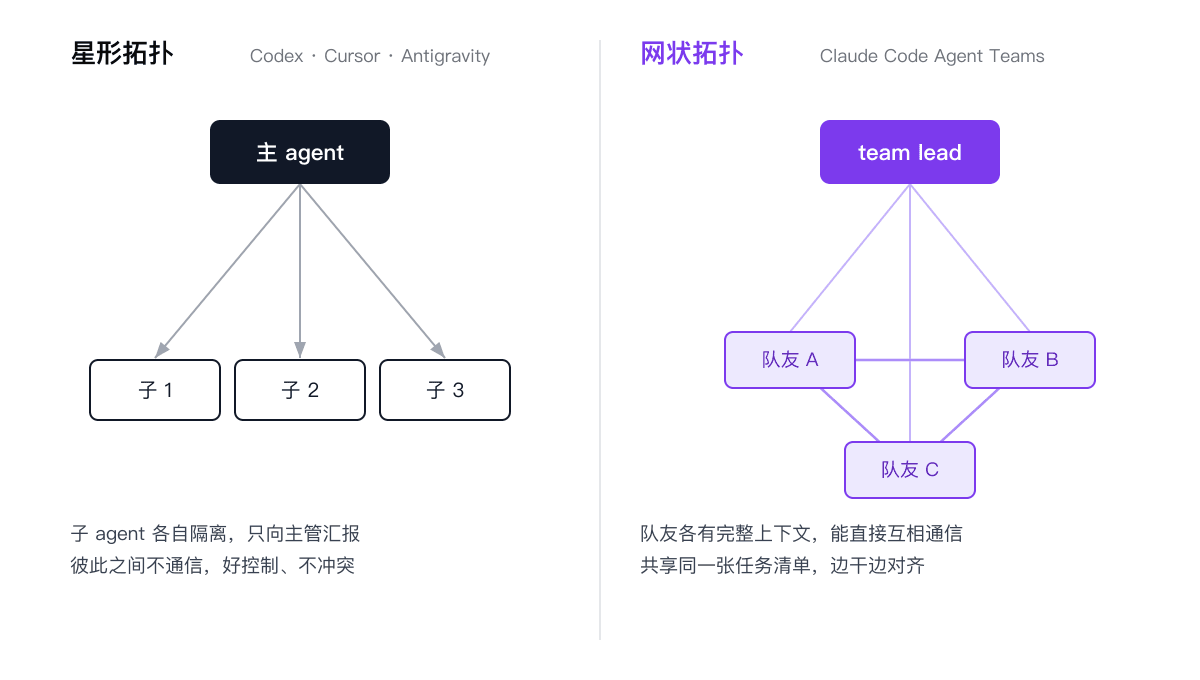
The first type is a star. Codex, Cursor, and Antigravity basically follow this approach: a main agent serves as the supervisor, divides the tasks and dispatches them to a bunch of sub-agents, and each sub-agent works in its own isolated environment (Cursor uses Git worktree isolation, and can open up to 8 parallel connections;Antigravity's Manager has a maximum of 5), and returns the results to the supervisor after completion. Sub-agents do not speak to each other, and no one knows what others are doing.
The advantages of this structure are that it is clean, non-conflict and easy to control. The disadvantage is that there is no way to negotiate between sub-agents-A cannot directly tell B the problems discovered by him, and all information has to be returned to the supervisor.
The second type is mesh. This is what Claude Code's Agent Teams has been doing recently, and the approach is obviously different: it has a team lead, but the "teammates" underneath are not isolated sub-agents, but each has a full context, can communicate directly with each other, and shares the same task list collaborators. When a teammate changes the task list, others can see it immediately; if A has any questions, he can ask B directly without going back to lead.
These two structures correspond to two completely different collaborative philosophies. The star is like an assembly line-disassembled, distributed, and summarized, suitable for the kind of work that can be cut cleanly. The mesh is like a really small team-communicating and adjusting while working. It is suitable for the kind of work where you can't tell how to tear it down and you need to align it while doing it.
This is what I think is the deepest difference in this wave of tools. It is not a question of whether the UI is good or not, but a question of how to organize multiple agents at the bottom level. However, this model cannot be given to you, so you can only rely on engineering to build it.
(By the way, Claude Code's Agent Teams is still an experimental function, and you have to manually open an environment variable to use it. But the direction is clear.)
4. What does it look like?
Form may sound superficial, but it actually determines the boundary of a tool's capabilities.
Now there are three main forms.
CLI (Command Line): Claude Code, Codex are representatives. It lives in the terminal and has no fancy interface, but because of this, it seamlessly connects into your scripts, CI, and various automated processes. Terminal party's favorite.
IDE (make your own editor, usually change VS Code): Cursor, Antigravity, Byte Trae go this way. The advantage is that it can see everything you are in the editor-where your cursor is, what files you have opened, what you have just changed, with the richest context and the most intuitive interaction.
Plug-ins (installed in existing editors): Cline, Tongyi Lingcode, Tencent CodeBuddy (CodeBuddy is made in all three forms). The threshold is the lowest. You don't have to change tools, but the permissions and contexts it can get are limited by the host editor.
The heavier the shape, the better. The CLI is the lightest but the most flexible, the IDE is the heaviest but the most comprehensive context, and plug-ins are the most convenient but limited. It determines how much the agent can see and how much it can move.
5. Whose ecology is it tied to
The last layer is also the most easily ignored but the most important layer in the long run.
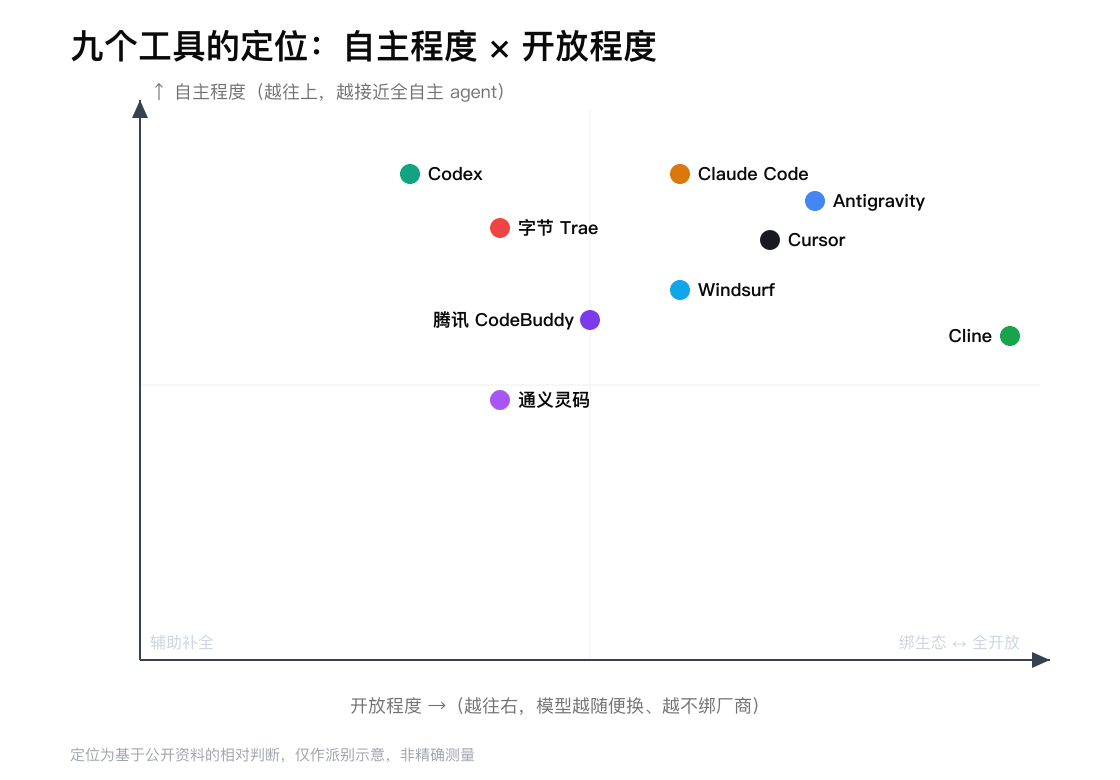
By putting the nine tools on a map according to their "degree of autonomy" and "degree of openness", several obvious factions can be seen.
The most open is Cline. Pure BYOK, open source, more than 30 models can be easily connected, and can be deployed in your own intranet or even disconnected environment. It doesn't tie anyone up, at the cost of you having to mess with the configuration yourself. For teams with data compliance requirements, this is almost irreplaceable.
What is tied most tightly is each family's own tools. Codex is tied to OpenAI, Claude Code is tied to Anthropic's billing system, and domestic Byte Trae, Tongyi Lingcode, and Tencent CodeBuddy are tied to Byte, Ali, and Tencent Cloud respectively. Tying the ecology is not a bad thing-tying it tightly often means a smoother experience and better connection with your own cloud services. But you have to think clearly whether you are choosing a tool or a long-term supplier.
Antigravity is a special case. It is backed by Google, but chooses to open it for free and supports competing models such as Claude. This is Google trading "free" for the market-it is betting that sooner or later this layer of the model will be leveled (the same judgment as I said at the beginning), and that the value lies in the platform and ecology, not in the model itself.
How to choose
After finishing the fifth floor, we will turn to how you choose.
If you are a terminal party, want to automate, and want to connect AI into CI: Claude Code or Codex, the CLI form is naturally suitable.
If you want multiple agents to truly collaborate and the work is difficult to tear down: Try Claude Code's Agent Teams, which is the first to go in the area of mesh structure.
If you value "verify yourself after writing" and like to visually stare at agents at work: Cursor or Antigravity, the built-in browser and parallel views are very handy.
If you have data compliance requirements and don't want to be locked in by any vendor: Cline, open source plus BYOK plus intranet deployment, there are almost no alternatives to this one.
If you are an enterprise, Java, and Chinese scenario: Tongyi Lingcode is the most solid at the enterprise level and in Chinese.
If you want to prostitute for nothing, think of a prototype in one sentence: Byte Trae's SOLO mode and Antigravity are both free, with the lowest threshold.
(By the way, I found that Byte Trae leads the market share of domestic tools and Alitong Yilingma ranks second, but the source is that community evaluation is not an authoritative organization, so you should use it as a general reference.)
Last
Back to the question at the beginning: Why are the tools so much worse for the same model?
After turning around, my judgment is this-the model gives the brain, but everything outside the brain, how to feed the context, what hand to give, how to team up, what shape to grow into, and who to tie it to, is all engineering, all built by each family itself.
And the more we go on, the more convergent the model layer will be. Today, we can still rely on "I took over the strongest model" to open the gap. When everyone can take over the strongest model tomorrow, the only thing that can open the gap will be engineering.
So next time you choose a programming tool, don't just ask what model it connects with. A few more questions: How does it understand my project, does it dare to do it by itself, can it do it with several agents, and will it tie me up?
The answers to these questions determine whether it works well or not.