How to adjust the free big model API and where are the pitfalls
I really adjusted the eight free models of Smart Spectrum one by one: glm-4-flashx had flash name but reported insufficient balance, glm-4.7-flash was current-restricted six times out of ten times, glm-4.5-flash was adjusted but returned empty-max_tokens were eaten up by the thinking process. It was also determined that current restriction is calculated based on the model or not based on the account, and reporting wrong information will deceive you. Attached with minimum runnable code and recurring script.
I have always had a free big model API hanging in my own projects. A few days ago, I tried a few more free models for another matter, and found that several things did not match the public statement-some models had flash names but were not free at all, some were tuned but returned to empty, and some were directly restricted six out of ten times.
He simply spent the afternoon adjusting his free models one by one, and wrote down all the quotas, current limits, return formats, and errors.
This is a call manual, not a review. All the numbers below were measured on August 10, 2026. I posted the script at the end of the text, and you can run it and reproduce it yourself.
Let's make the scope clear first: I only have the available key from Zhipu, so only it is true. The status of the other two families is also memorized conveniently, at the end of the article. I haven't tested other homes, so I can't guarantee them.
first to see which ones are really free
There was a trap at the beginning: The /models interface of Smart Spectrum cannot list free models.
curl https://open.bigmodel.cn/api/paas/v4/models \
  -H "Authorization: Bearer $KEY"
What is returned is glm-4.5, glm-4.6, glm-4.7, glm-5, glm-5-turbo, glm-5.1, and glm-5.2. They are all paid main players, and there is not a flash . If you follow this interface to find a free model, you will find nothing. The ID of free models can only be retrieved from the document.
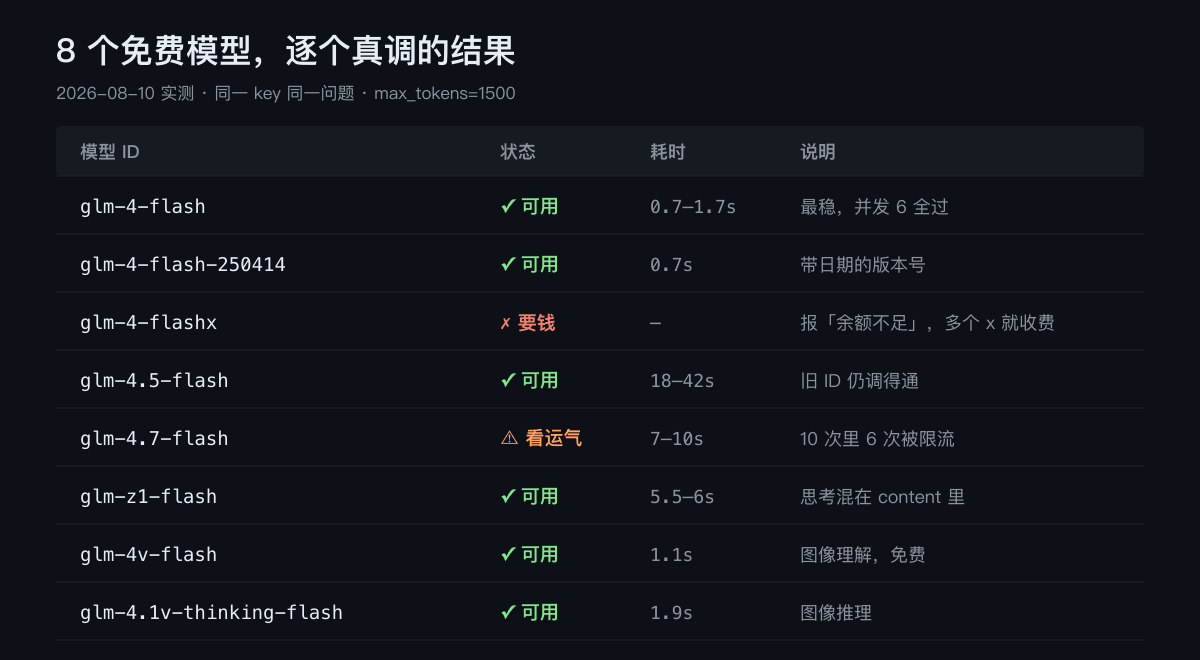
I tried all the free model IDs mentioned in the public information, and the measured results:
| model ID | Can it be adjusted? | time-consuming | description |
|---|---|---|---|
glm-4-flash | ✓ | 0.7–1.7s | The most stable, the main force in daily life |
glm-4-flash-250414 | ✓ | 0.7s | Dated version number |
glm-4-flashx | ✗ | - | The balance reported is insufficient and is not free |
glm-4.5-flash | ✓ | 18–42s | Old ID can still be adjusted |
glm-4.7-flash | ⚠ | 7–10s | It can be used, but it is restricted six times ten times |
glm-z1-flash | ✓ | 5.5–6s | reasoning model |
glm-4v-flash | ✓ | 1.1s | image Understanding |
glm-4.1v-thinking-flash | ✓ | 1.9s | image reasoning |
glm-4-flashx should be mentioned separately. The name looks exactly like flash. Many summary articles list it in the free list. What actually returns is:
{"error":{"code":"1113","message":"余额不足或无可用资源包,请充值。"}}
One more x costs money. I had no balance in my account, so it didn't run through once.
QKPFX0 The most difficult one for QK: The tune is turned on, but the return is empty
We stepped on this pit in our own project, and after stepping on it, we came to a wrong conclusion , which remains hanging to this day.
The phenomenon is like this: Call glm-4.5-flash or glm-4.7-flash, HTTP 200, and no error is reported, but choices[0].message.content is an empty string. The conclusion at that time was,"There is a problem with this thinking model. Don't use it and replace it with glm-4-flash."
This time, I tried one by one and found that the model was fine, but the parameters we gave ourselves were wrong.
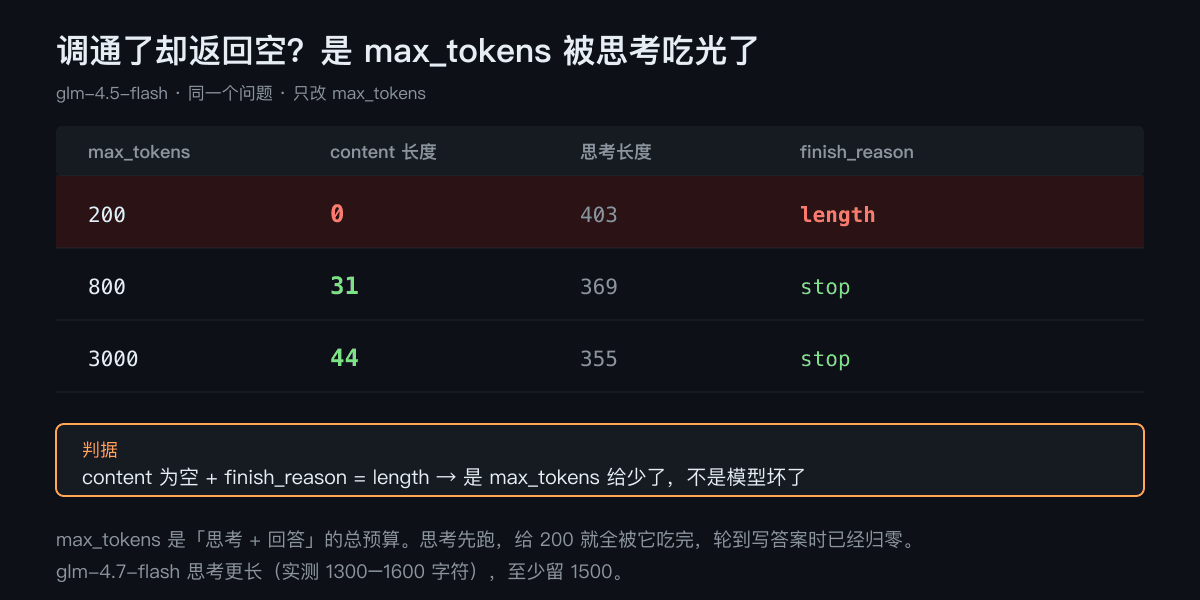
Looking at this set of comparisons, for the same model and the same problem, only max_tokens is changed:
| max_tokens | content length | length of reasoning | finish_reason | Complete tokens |
|---|---|---|---|---|
| 200 | 0 | 403 | length | 200 |
| 800 | 31 | 369 | stop | 215 |
| 3000 | 44 | 355 | stop | 210 |
Do you understand--max_tokens is the total budget of "think + answer", not just answer.
This kind of thinking model will first reason in the stomach, and the reasoning itself will consume two to three hundred tokens. If you give 200, it will be used up just thinking. By the time it comes to write the answer, the budget will be zero, so content returns to empty. finish_reason is length (meaning "truncated by length"), not stop.
The criterion is very clear: content is empty + finish_reason is length, which means that max_tokens are given less, not that the model is broken.
glm-4.7-flash takes a longer time to think. I measured that its reasoning_content can reach 1300 - 1600 characters, so I left at least 1500 for it to get the answer stably.
By the way, the return formats of these three thinking models are not the same , and those who write code must be treated separately:
glm-4.5-flash,glm-4.7-flash: The thinking process is placed in themessage.reasoning_contentfield, and thecontentis a clean answer.glm-z1-flash: Thinking process directly mixed incontent, wrapped in<think>label. The content I got was this:
<think>
嗯,用户让我用一句话说明什么是API。首先,我需要确认...
</think>
API 是不同软件之间约定好的接口...
If you directly throw content to users, it will show its inner drama together. You have to press </think> to cut it yourself and remove the second half.
Second pitfall: Current limiting is calculated based on the model, and reporting wrong information will deceive you
A few days ago, I checked the drawing interface and sent 6 requests concurrently. Four of them immediately returned 429. The error message read:
Your account has reached the rate limit, please control the request frequency
"Your account"-What I understood at the time when I saw this sentence was that the entire account was limited, and no other models could be adjusted at this time.
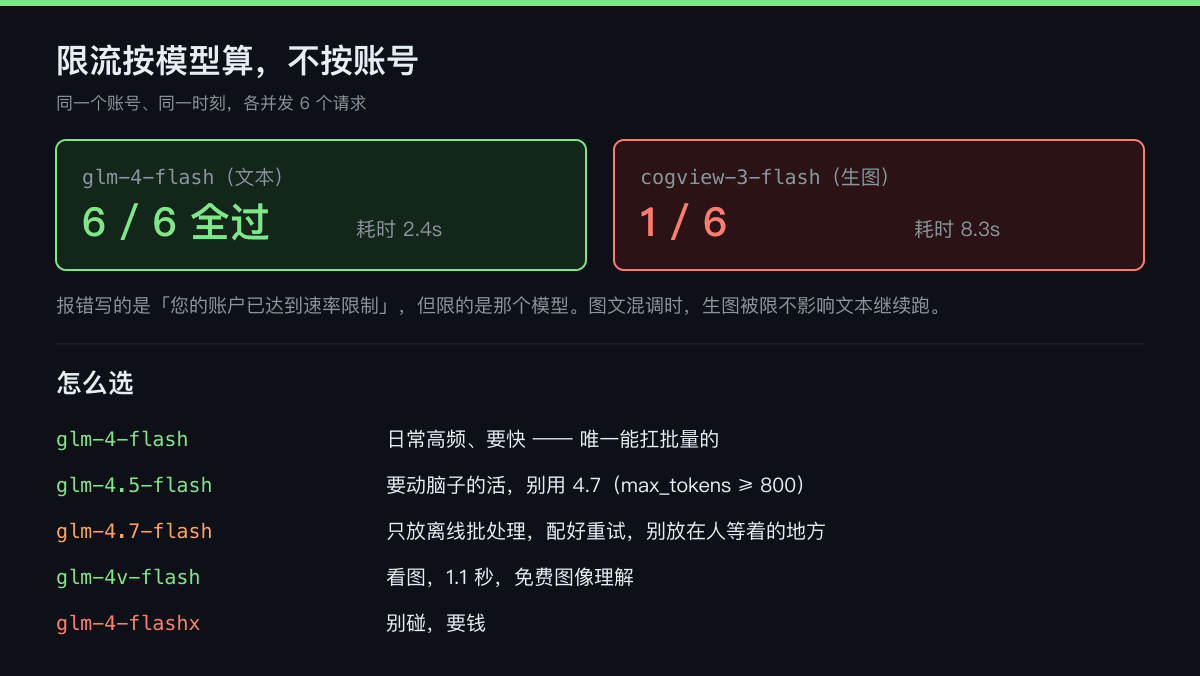
This time, a special control experiment was conducted. For the same account and the same time period, the two models each had 6 requests concurrently:
| Concurrent 6 | successful | time-consuming |
|---|---|---|
glm-4-flash (text) | 6 / 6 | 2.4s |
cogview-3-flash (raw picture) | 1 / 6 | 8.3s |
All the texts are passed, and only one raw picture is passed. Same account, same moment.
So the sentence "your account has reached the rate limit" is misleading-it is the limit for that model , not your account. The concurrency limit for the generated picture model is much tighter, and the text model is much looser.
This difference is very practical: if your program has mixed graphics and text, text tasks can continue to run when the graphics are limited, without stopping the entire process.
There is also a related finding that there is no current limit field in the response header . I looked through all the headers returned, and there was no such thing as X-RateLimit-Remaining. In other words, you can't know in advance how much quota you have left, you can only know when you hit 429. You must write and retry yourself in the program.
glm-4.7-flash said separately: It works, but you have to accept that it ignores you six times out of ten times
This model has received high reviews from public data-30B, 200K context, and free. The actual call experience is another matter.
I adjusted it 10 times in a row at 2-second intervals, and max_tokens gave 1500:
#1  ✗ 1305 该模型当前访问量过大
#2  ✗ 1305
#3  ✓ 9158ms   content=33  reasoning=1329
#4  ✓ 9734ms   content=44  reasoning=1224
#5  ✗ 1305
#6  ✗ 1305
#7  ✗ 1305
#8  ✓ 7301ms   content=44  reasoning=988
#9  ✗ 1305
#10 ✓ 9695ms   content=69  reasoning=1346
Successful 4 times and limited 6 times. The average time of success was 8.9 seconds.
The error code 1305 is not the same as the previous 1302: 1302 means "You tune too fast", and 1305 means "Everyone is competing for this model now." The latter has nothing to do with your call frequency, it's just that the public resources on the model side are not enough-so it's useless for you to reduce the frequency, so you can only try again.
My judgment is: It is not suitable for placing anywhere that requires immediate response. With a nine-second response time and a 40% success rate, scenarios where users are waiting in front are directly eliminated. It is suitable for offline batch processing-run a task at night and try again if it fails. Anyway, you are not in a hurry, just in time to pay for its 200K context.
If you want to get results stably, the retry logic has to be written as follows (1305 requires a retreat from retry, not a direct failure):
async function callWithRetry(model, messages, maxTokens = 1500) {
  for (let i = 0; i < 6; i++) {
    const r = await fetch('https://open.bigmodel.cn/api/paas/v4/chat/completions', {
      method: 'POST',
      headers: {
        Authorization: `Bearer ${process.env.ZHIPU_API_KEY}`,
        'Content-Type': 'application/json',
      },
      body: JSON.stringify({ model, messages, max_tokens: maxTokens }),
    })
    const j = await r.json()

    // 1305 模型侧繁忙 / 1302 自己调太快,都退避重试
    if (j.error && (j.error.code == 1305 || j.error.code == 1302)) {
      await new Promise((s) => setTimeout(s, 2000 * (i + 1)))
      continue
    }
    if (j.error) throw new Error(`${j.error.code} ${j.error.message}`)

    const msg = j.choices[0].message
    // 空 content 一般是 max_tokens 不够,翻倍再来一次
    if (!msg.content?.trim() && j.choices[0].finish_reason === 'length') {
      maxTokens *= 2
      continue
    }
    return msg.content
  }
  throw new Error('重试用尽')
}
minimum runnable call
The free model and the paid one are the same interface, so just change the model. The base URL is https://open.bigmodel.cn/api/paas/v4.
curl version, you can copy and run:
curl https://open.bigmodel.cn/api/paas/v4/chat/completions \
  -H "Authorization: Bearer $ZHIPU_API_KEY" \
  -H "Content-Type: application/json" \
  -d '{
    "model": "glm-4-flash",
    "messages": [{"role": "user", "content": "你好"}],
    "max_tokens": 800
  }'
It is compatible with OpenAI's interface format, so the ready-made OpenAI SDK can be used directly by changing base_url without changing libraries:
from openai import OpenAI

client = OpenAI(
    api_key="你的key",
    base_url="https://open.bigmodel.cn/api/paas/v4",
)

r = client.chat.completions.create(
    model="glm-4-flash",
    messages=[{"role": "user", "content": "你好"}],
    max_tokens=800,
)
print(r.choices[0].message.content)
This is quite convenient-you used to take code written by OpenAI without using logic.
How would I choose?
According to the measured results, my division of labor is as follows:
Use glm-4-flash for daily high-frequency and fast tasks. It returned in 0.7 seconds and followed by 6 passes. It was the only one in this batch that could withstand the batch. I hang it at the bottom of my own project.
If you want it to use brain work, use glm-4.5-flash, not 4.7. 4.5 Although it is slow (ten to forty seconds), it is not limited to six times in ten times like 4.7. Remember to give max_tokens more than 800.
Offline batch processing requires a long context before glm-4.7-flash turn. Be ready to try again and accept its temper.
Use glm-4v-flash to see pictures. Bit by bit, free image understanding, this is really fragrant.
Don't touch glm-4-flashx. Ask for money.
Another two I tried
Silicon-based flow : After the balance of my account is exhausted, I adjust the Kolors drawing and return it to {"code":30001,"message":"Sorry, your account balance is insufficient"}. There is an easy misunderstanding point here-many people think that the platform is marked with free models and will not eat the balance. The actual measurement is that once the account balance is empty, the entire key cannot be adjusted.
Gemini: gemini-2.5-flash-image returns 429. The error message clearly states limit: 0-the quota for the free layer on this model is zero. It's not that I overused it, but that I didn't give it at all. There is a long list of image models in its model list (image-4.0, gemini-3-pro-image, etc.), but whether it can be tuned for free is another matter.
I don't have available keys for Kimi, DeepSeek, ModelScope, etc., I don't test them, and I don't write them.
You can reproduce it yourself
All the above conclusions come from the script below, which is run for about two minutes. Change it to your own key:
const KEY = process.env.ZHIPU_API_KEY
const MODELS = ['glm-4-flash', 'glm-4-flash-250414', 'glm-4-flashx',
  'glm-4.5-flash', 'glm-4.7-flash', 'glm-z1-flash', 'glm-4v-flash']

for (const model of MODELS) {
  const t0 = Date.now()
  const r = await fetch('https://open.bigmodel.cn/api/paas/v4/chat/completions', {
    method: 'POST',
    headers: { Authorization: `Bearer ${KEY}`, 'Content-Type': 'application/json' },
    body: JSON.stringify({
      model,
      messages: [{ role: 'user', content: '用一句话说明什么是 API。' }],
      max_tokens: 1500,
    }),
  })
  const j = await r.json()
  const m = j.choices?.[0]?.message ?? {}
  console.log(model.padEnd(24),
    j.error ? '✗ ' + j.error.code + ' ' + j.error.message
      : `✓ ${Date.now() - t0}ms content=${(m.content || '').length} reasoning=${(m.reasoning_content || '').length}`)
}
The platform's free quotas and current-limiting strategies are changed frequently, and the shelf life of my data is about a few weeks. Before you really want to go online, it's safest to go through it yourself-after all, the lists written by others, including this one, may have expired.