AI compresses the context, what did it throw for you?
People who work heavily with AI have probably seen the line-"compressing the context." At that moment, AI was doing something very important for you: decide which of your previous conversations and work to keep and which to throw away. And this decision is basically invisible to you and cannot intervene by default. What it throws away may be exactly what you want to use later-this is the root cause of AI's sometimes sudden "amnesia." This article compares the mainstream agents on the market The compression mechanism of (Claude Code, Codex, Gemini CLI, OpenHands, Aider) has been taken to the source code level, breaking down this "trade-off pipeline": In what order is it pressed (delete the cheapest tool output first → protect the nearest and nailed ones → make the model summarize into a summary if it is not enough), the nine-paragraph template that Claude Code forces the model to fill in when summarizing, what survives and what is lost (remember "what to do" but forget "why"), the four genres of each pressing method, and how to put key information on the "unbreakable layer" and not be trapped by it. One-sentence conclusion: The so-called automatic compression is not that AI can remember more, but that it has learned to forget strategically.
If you are working heavily with AI, you have probably seen a line like this-"compressing the context", or a progress bar that goes to the end, reminding you that the context is almost full.
Then, what is AI doing?
Most people don't think about it. You think it's just "tidy up, make room, and continue to chat with you." But in fact, at that moment, it was doing something very important for you: deciding what to keep and what to throw away from all your previous conversations and work. Moreover, this decision is basically invisible to you, and you can't intervene by default.
What it throws away may be exactly what you will need to use later. This is why sometimes AI suddenly "loses memory"-if it is good in the past, compress it, it will forget what you have repeatedly told you.
I have thoroughly explored the compression mechanisms of mainstream agents on the market, from Claude Code to Codex, Gemini CLI, OpenHands, and Aider. I found that the way they pressed was very different, but the underlying logic was the same. Today, let's completely tear down this "compression line": in what order it will be pressed, what will survive, what will be lost first, and how you can not be trapped by its oblivion.
first corrects a misunderstanding: Compression is not "condensing into essence"
Many people think that compression means AI "intelligently summarizes what we talked about before into the essence" and leaves the key points.
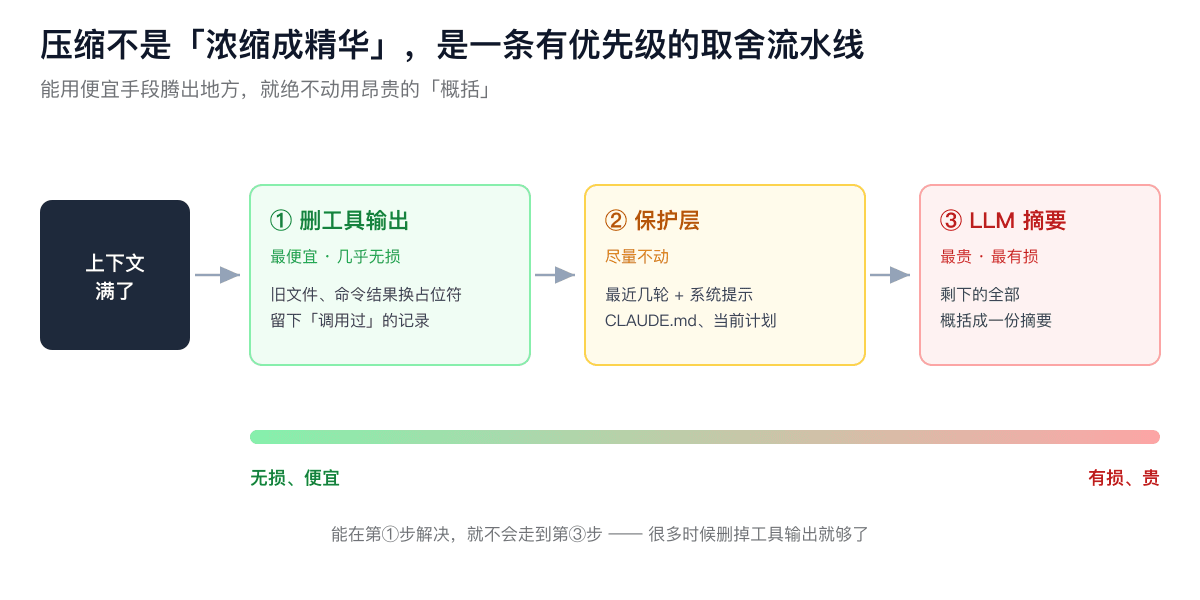
Not exactly. Real compression is a set of choices with clear priorities -it does not "summarize" it at the beginning, but starts with the least valuable and most space-occupying ones. If you can use cheap means to make room, you will never use expensive "generalizations".
Understanding the order of this pipeline is more important than remembering any individual technique. It takes about three steps, from the most damaging to the most damaging.
First Knife: Delete tool output first
When AI is working, what takes up the most space is not your conversation, but the output of the tool -the contents of the files it has read, the results of running commands, and a lot of things returned by searches. These can take up 70% to 80% of the space in a working agent.
And these things have one characteristic: You can throw them away after you use them, and you can adjust them again when you need them. Whether it remembers the content of the document it has read doesn't matter in the context or not. Anyway, it will read it again when needed.
So the first cut of compression is always cut here first: replace the output of the old tool with a placeholder (similar to "the old result has been cleared"), but keep the record of "I called this tool at the time." This way the model knows that it has done this, but the specific results are not in sight.
This cut is cheap, fast, and almost non-destructive-you don't need to call the model, just delete it mechanically. Claude Code will silently do this cleanup before answering every time, leaving only the results of the last 5 tools and clearing the rest. Anthropic's interface also has a special switch to do this. You can set "Keep the results of the most recent tools, at least how many tools you have cleared, and which tools you have cleared will never be clear."
Many times, space is made up with this slash alone, and there is no need for more ruthless methods later on.
protective layer: recent, and nailed
The second thing is to try not to touch the part.
One category is "recent". Keep the most recent conversations and the most recent rounds of operations as they are-because what you are doing right now depends on it.
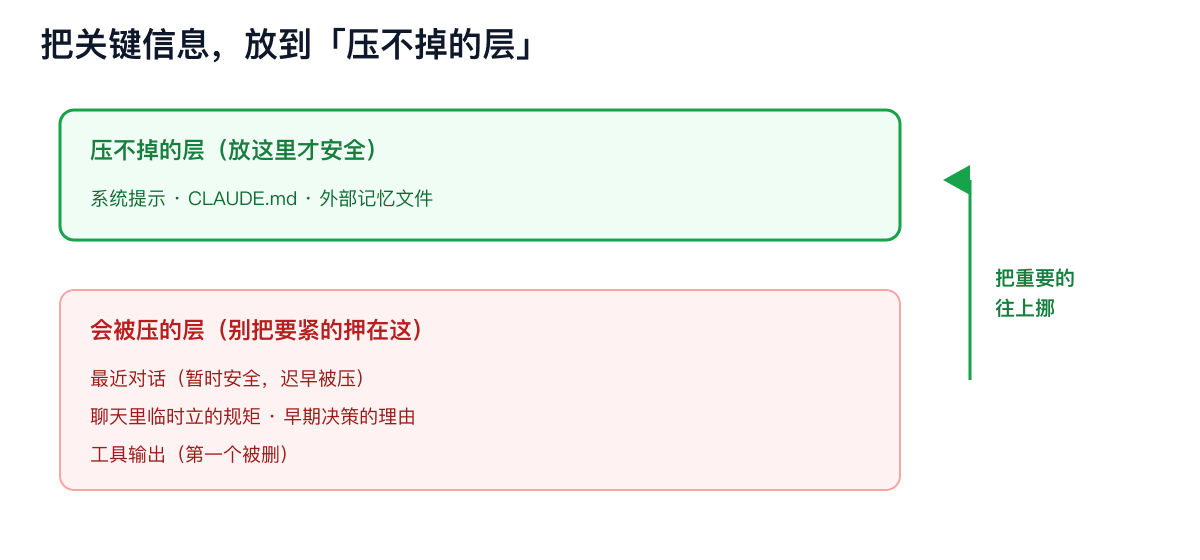
One type is "nailed". System prompts, CLAUDE.md in the project root directory (if you use Claude Code), current task plans, skills being used-these are pinned in the context and compressed and not touched.
There is a particularly important point hidden here that many people don't know: The rules you wrote in CLAUDE.md cannot be compressed and moved; but if you explain them temporarily in the chat, you can compress and delete them as you say. Its meaning will unfold later.
Last trick: Ask the model to write a summary of the rest
The first two steps weren't enough, and it came to the last step-let the model summarize the rest of the history into a summary, and then replace the entire original long dialogue with this summary. This is the most expensive (extra model adjustment) and most damaging step.
In this step, there is one detail that I think is most worth talking about.
Many people think that it is just a sentence to the model,"Help me summarize the front." No. At least Claude Code isn't-it uses a fixed nine-segment template , forcing the model to fill in paragraphs one by one according to the format:
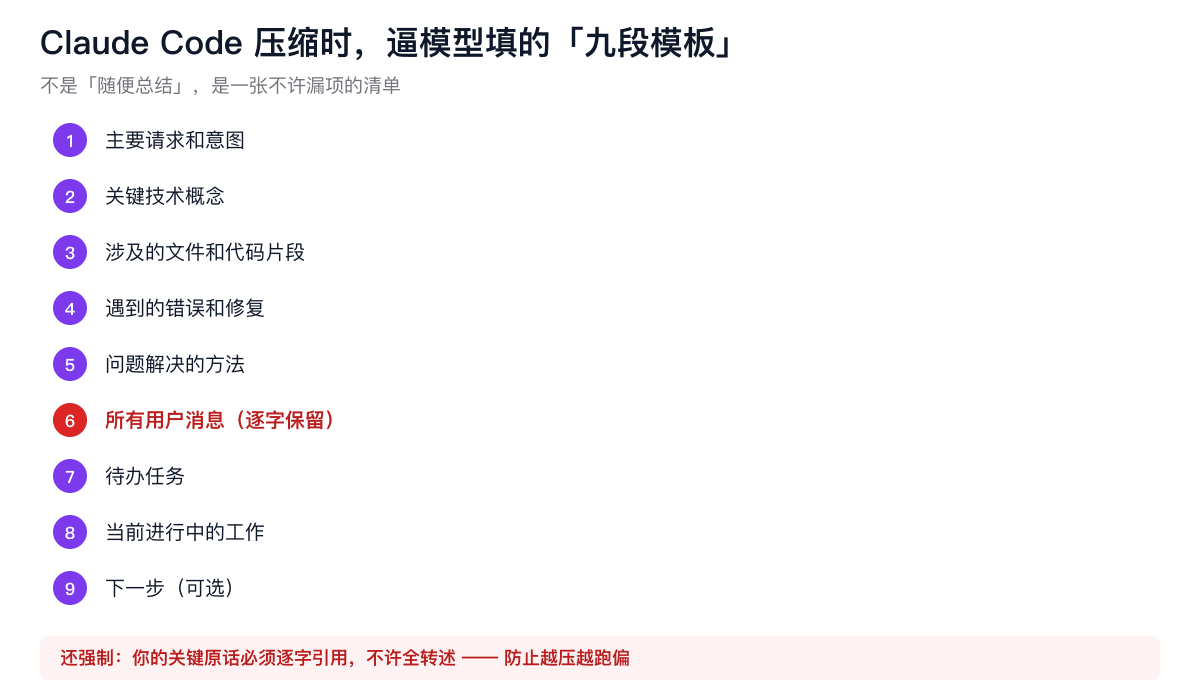
Look at these nine paragraphs-it not only wants "what was talked about", but also "why"(intention),"where stuck"(errors and fixes), and "what to do next"(to do, next step). It even requires the model to quote the key words you said verbatim, and is not allowed to paraphrase them in a different way . Why? Because once you allow it to "understand and repeat it on its own", it will go astray as it turns, and the more you press, the more you deviate from your original meaning. A verbatim quote is a lock on it.
By the way, if you have used Claude Code, you will sometimes see the line "This session is being continued from a previous conversation..."-- That entire paragraph is the summary itself. If you see it, it means that your conversation has been suppressed and changed for one round.
So what survived and what was lost
After circling around, I returned to the most critical question: After pressing, what was left and what was lost?
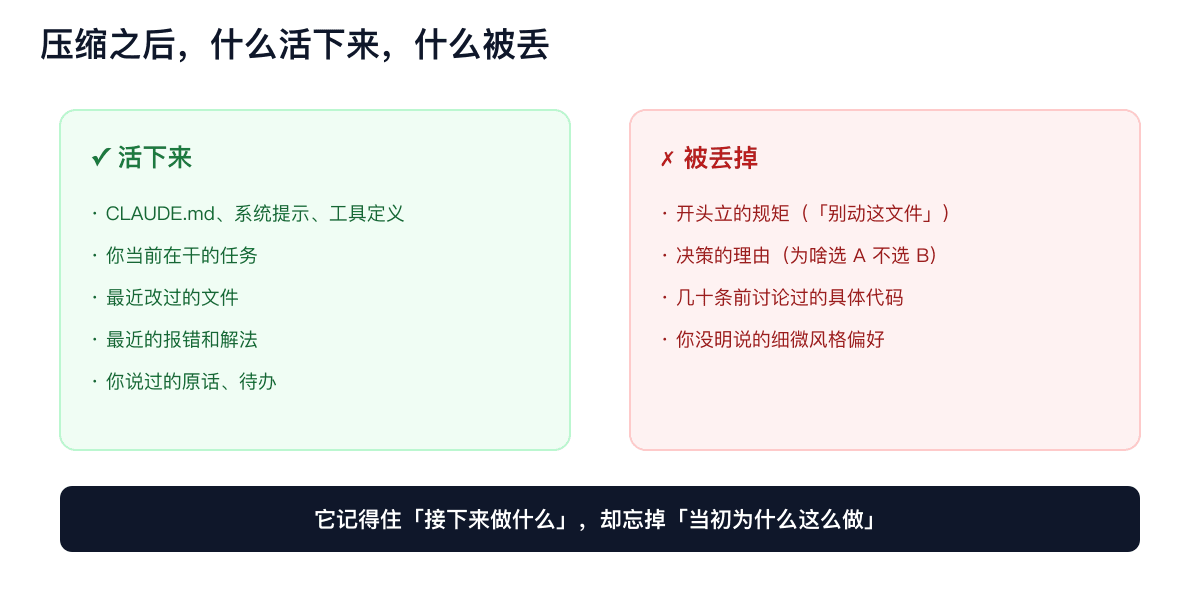
Surviving : CLAUDE.md and system prompts, tool definitions, tasks you are currently doing, documents you have recently corrected, recent error and settlement methods, exact words you said, and unfinished to-do items.
Lost : The rules you set at the beginning ("Don't move this file" and "Use this format for output"), the reasons for making the choice in the middle (why did you choose Plan A instead of B), dozens of messages The specific code discussed before, and the subtle preferences you didn't say clearly but wanted it to follow.
Understand this asymmetry and you will understand why AI has "amnesia"--
It can reliably remember "what to do next" but systematically forget "why did it in the first place." The "why" when making decisions is almost always the first one to be sacrificed. Because the design goal of compression is to "allow the task to continue to move forward", not to "retain the ins and outs of your journey."
This also explains a very common pit: You repeatedly confirmed with it earlier,"Let's use this plan because the other one has a pit." After compressing it, it remembers "use this plan" and forgets "because the other one has a pit"-later, it may happily lead you back to that pit.
's various pressure methods are actually divided into several genres
The above set mainly takes Claude Code as an example. But different agents have quite a lot of differences in pressure methods, which are roughly divided into several schools-no matter whether you use foreign or domestic tools, you will be clear by comparing them.
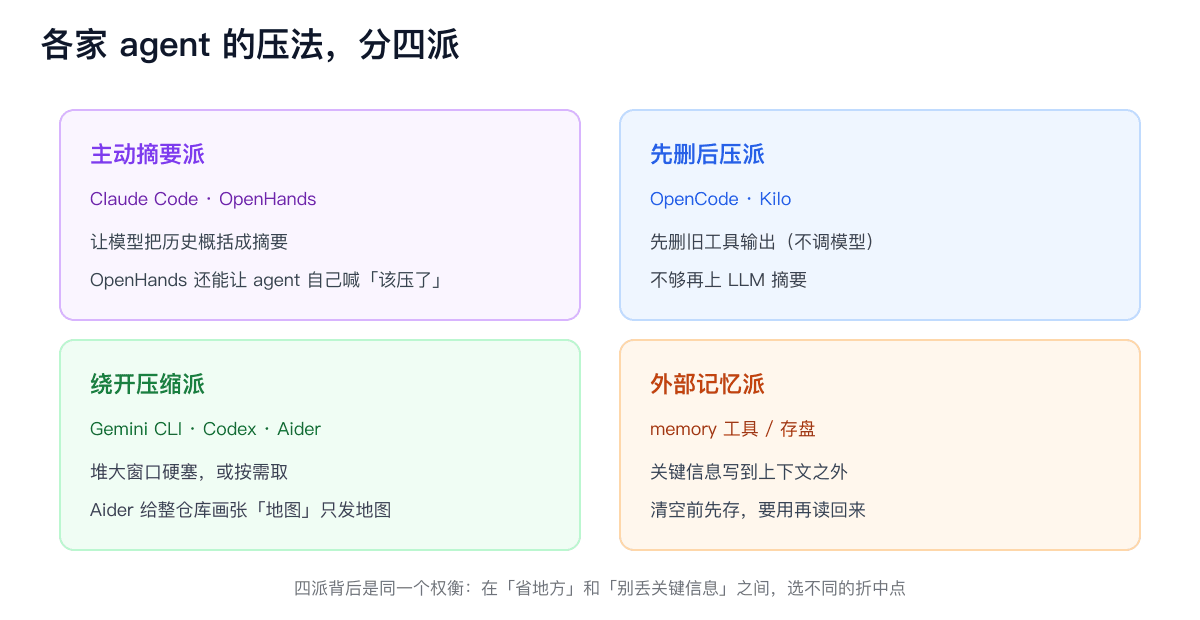
Active summary group : Claude Code is the representative, so is OpenHands. OpenHands 'approach is even more interesting-its summary specifically focuses on "the user's goals, what has been done, what has not been done, critical files and failed tests", and it allows the agent to shout "I think it's time to press" and proactively trigger it.
Delete it first and then suppress it : OpenCode, Kilo take this approach. It breaks the process into two sections-first deleting the old tool output (no model adjustment, cheap), and if that's not enough, then posting the LLM summary. And it has a rule: unless enough space can be vacated (such as more than 20,000 tokens), it is not worth doing it locally.
Avoid the compressionists : Some tools simply try not to press. Gemini CLI relies on stacking windows to be as large as possible (millions) and plugging them in as much as possible. Codex and Aider changed their thinking-instead of stuffing the entire project in, they picked it up on demand: Aider is very clever. It uses code parsing to draw a "map" for your entire warehouse, only marking what key classes and functions are, and in which file, send this lightweight map to the model. The model depends on the details of which file, and then pick it up separately.
External memory : Another trick is to write key information outside the context-save it in a file on the hard drive, save it before emptying, and then read it back after using it. This is actually giving AI an external file.
Under these schools, there is the same trade-off: each party has chosen a different compromise point between "saving money and space" and "not losing key information."
There is another easily overlooked but critical difference: Delete and transfer are not the same thing.
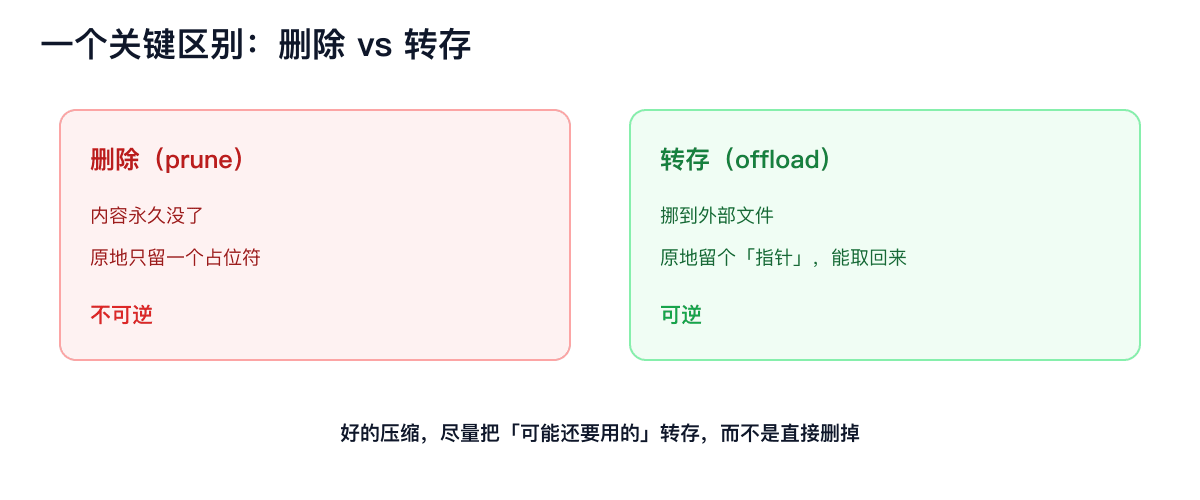
Deletion is permanent; transfer is to move the content to the outside, leave a "pointer" in place, and retrieve it when needed. One is irreversible, the other is reversible. For good compression, we will try our best to transfer what we may need to use instead of deleting it directly.
After all, there is no "lossless compression"
After talking so much about mechanisms, I want to say something that may be disappointing: Don't believe the word "lossless compression".
As long as you suppress more into less, it will definitely be damaged. This is written in the essence of information. The only difference is-whether it's the part you're missing that happens to be using.
The trouble is: When automatically compressing, the machine makes this choice for you, and it often loses the wrong one. It summarizes architectural decisions that you find important, but leaves a bunch of useless intermediate outputs. Some reviewers have specifically tested it and asked various compression methods to remember "which files have been modified in this round", but the results are generally poor.
So, instead of expecting it to press accurately, you might as well take the initiative to cooperate with it.
A few things you can do
Once you know how it presses you, you know how not to be deceived by it:
Put key information on an "unbreakable layer". This is the most important one. Project-level rules and must-not-wrong constraints, don't just say them once in chat-write them into a system-level place like CLAUDE.md(as mentioned earlier, you can't compress it); save important facts and data in external files. Chat history is the most easily suppressed layer. Don't risk your life there.
Don't wait for it to press automatically, pick the opportunity to press. Automatic pressing is always triggered when it is about to burst, when it panic and the pressure is rough. You might as well manually trigger compression when a task has just come to an end and the context is still clean, and clearly tell it that "this time, focus on keeping the part about XX." What you specify is more accurate than it can guess.
Important conclusions, repeat them yourself and nail them down. Since the tool output will be deleted first, let it (or you) summarize and write down the key conclusions drawn from a large number of outputs in one sentence-this sentence will remain, and the original one will be cleared.
Break up long tasks. Don't bet on carrying a context from beginning to end. Break it into several sections, complete and confirm each section, and then start the next section.
Last
Go back to the beginning of the "compressing" moment.
What I understand now is: The so-called automatic compression is not that AI has become smarter and can remember more things. On the contrary-- It's AI that learned to tacitly forget.
Every trade-off it makes for you is essentially a bet: a bet that you don't need the part it throws away next. If you win the bet, you think it is smart and worry-free; if you lose the bet, you will encounter an inexplicable "amnesia".
You can't keep it from being forgotten-the context is limited and forgetting is inevitable. But you can decide to nail what to put where it cannot forget and leave it with what to forget.
By understanding this trade-off logic, AI's "amnesia" is no longer a metaphysics that catches you unprepared, but something that you can predict, manage, and even use.