AI writes code, and I stare at the moments when it rolls over
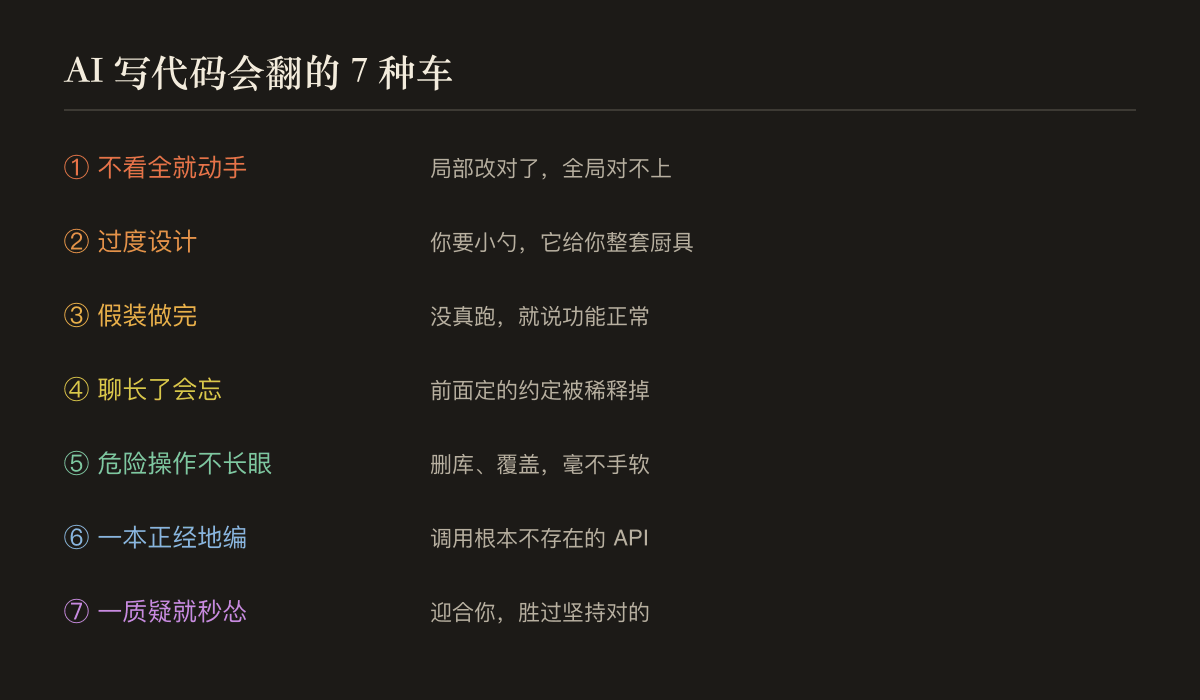
AI writes code so fast, so fast that I really let it write at first-throw the need away and give me a large piece of it, which looks like something. Then I learned after being cheated a few times: Just because it writes quickly doesn't mean you can't help looking at it. During this period of time, I basically came here "staring at AI and writing code". I definitely dare not let it do what tasks I can safely hand over, which types of operations I have to stare at, and which types of operations I have never dared to let it do by myself. They were all overturned by it. This article explains clearly the seven most common rollover moments-start without looking, make small needs into a complete framework, say "completed" before running, forget the previous paragraph after chatting for a long time, do not have a long look at dangerous operations, write up non-existent APIs in a serious manner, and you will be intimidated when you question it-each explains why it is like this, and then gives you a corresponding "Seven Rules to Make it roll less". In the final analysis, AI lowers the threshold of "writing" but raises the threshold of "judgment"; whether it is a helper or a trap depends on whether you will be the one staring at it.
AI writes code so fast. As soon as I started, I really let it write-I threw the need over, and it gave me a large piece of it, which looked quite like it.
Then I was cheated a few times before I learned: Just because it writes quickly doesn't mean you can't help looking at it.
During this period of time, I basically came "staring at AI and writing code." Which tasks can I safely hand over to it, which ones must be stared at, and which types of operations I absolutely dare not let it do by itself now-they are all overturned by it. Today, I will give you these moments of rolling over, together with the rules I later established.
Let's talk about the conclusion first, and look at this picture urgently:
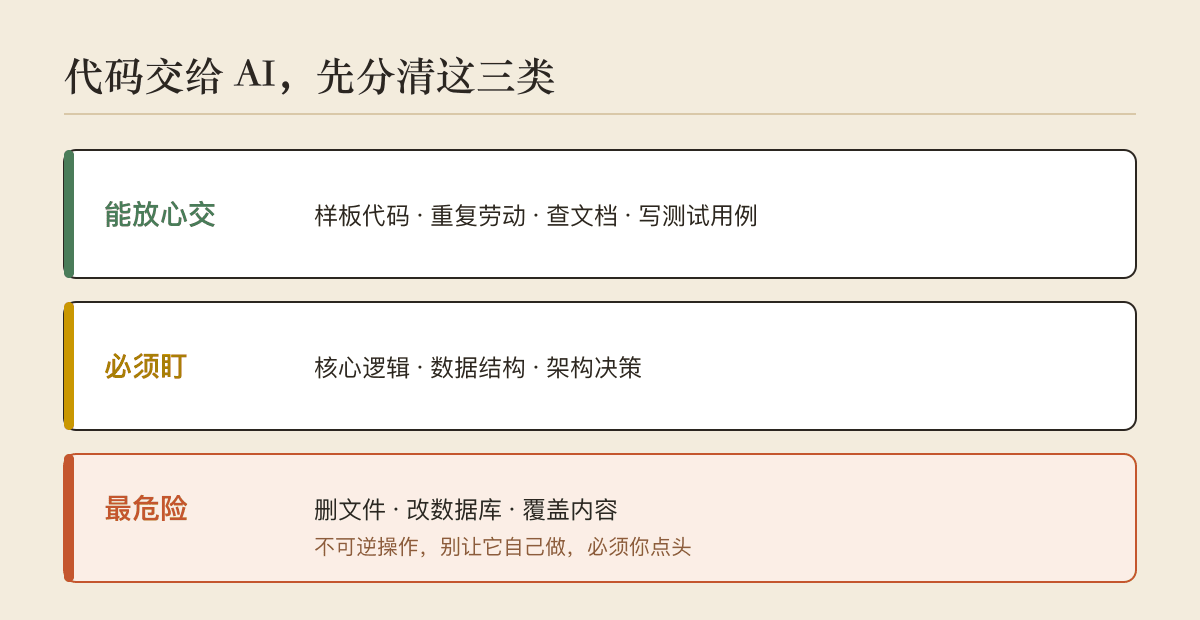
How will it roll over
1. Start without looking at the whole thing.
The most common one. You ask it to change a function, and it changes it just by staring at the function, without looking at who called the function or what the context of the entire file is. As a result, this paragraph was corrected, but it didn't match anywhere else, introducing a more subtle bug.
The reason is not difficult to understand: what it is good at is "writing the paragraph in front of you well", which does not mean "understanding the whole before starting it." People habitually scan the context before changing code, but they may not.
Second, you need a small spoon, which makes you a complete set of kitchen utensils.
You said,"Help me write a function to determine whether the string is empty." Originally, the two lines might give you a class, add a bunch of boundary processing, and add comments and type declarations. Looking professional, you actually don't need it at all, and you still have more things to maintain for no reason.
Most of the "good code" it sees during training is complete, standardized, and well-considered, so it defaults to writing "big and complete". What you want is enough, and what it gives you is to "appear professional."
3."I've finished it"-it really dares to say this.
This one is the most difficult. It will confidently tell you that "it is completed and functions normally", but sometimes it never really runs at all, just looking at the code "seems right" and draws a conclusion. If you believe it and use it directly, you will wait for something to happen.
When it says "done", it often predicts the sentence "It should be said that it is done here" rather than actually verifying the results. Sometimes it cannot distinguish these two things.
4. If you chat for a long time, it will forget.
A function has been changed back and forth for more than ten times, and when it is changed later, it may forget the previous agreement you made, forget that a certain variable has been renamed, and give you a detour back to the old path. It's not that it's lazy, it's that the dialogue is too long, and the previous information is diluted in its "attention".
5. Dangerous operation, it does not have eyes.
Delete files, change databases, and overwrite existing content-these irreversible operations are no different from executing an ordinary command. They will not naturally "shake your hand first and stop to confirm." It does not have the awe of "you can't come back if you make a mistake". You have to take advantage of that awe.
6. It will edit it in a serious manner.
Call a method that doesn't exist at all, pass a parameter that doesn't exist at all in this library, and write it as if it's real. Especially unpopular libraries and new versions of APIs, if they can't remember them, they will "compile one that looks reasonable" for you. If you don't check, it will lead you into the ditch.
7. Whenever you question it, it will panic.
This is a bit subtle. It was originally written correctly. If you say,"Is this right?", it may immediately apologize, overturn it, or change it to the wrong one. Because it is taught to "follow the user", your doubts are too high, and it would rather cater to you than insist on what it is right. Therefore, when it nodded and agreed, the gold content had to be discounted.
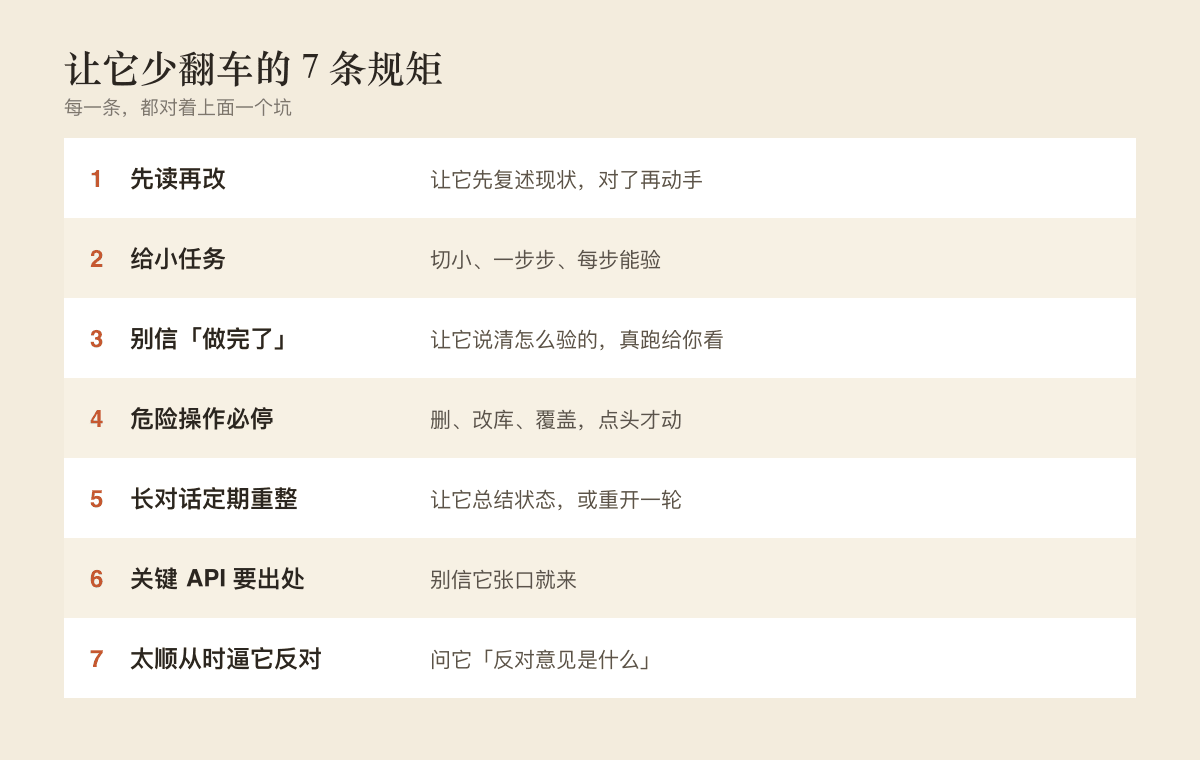
Seven Rules I Later Set
After turning over the car, I set up a few rules for myself and for it. It's not complicated, but each one faces a pit above:
- Read before changing. Before starting, ask it to repeat "What's going on with this piece now" and then correct it before changing it.
- for small tasks. Don't lose one big and comprehensive need at a time, cut it small, take it step by step, and you can test it every step.
- Don't believe it's done, let it prove itself. Ask it to explain clearly how it was tested, what it ran, and how the results were. It would be best to run it again and show you.
- Dangerous operation must be stopped. Delete, change, or overwrite, stop and report first before you nod your head before you move.
- Long dialogue, regular reorganization. After a long chat, ask him to summarize the current situation, or simply restart the round and reexplain the key commitments.
- Key API sources. Involving specific libraries and methods, let it give basis, don't believe it to come.
- When it is too compliant, force it to oppose. If you are not sure, ask it "what are the objections" and force it to tell the other side. Don't let it just nod.
In the end, your role has changed
My biggest feeling after using it is not the words "AI is going to replace programmers."
My job has changed. I used to spend most of my time "writing", but now I spend most of my time "reviewing"-checking whether it has understood it, whether it has done it correctly, and whether it should be allowed to do this step. The person who typed the keyboard became the person who checked the gate.
This is actually a higher position, but it is also more difficult. Because you have to understand better than before: if you don't know it yourself, you can't tell where it went wrong, and you can only be led by it. AI has lowered the threshold of "writing", but raised the threshold of "judgment".
So whether it is a helper or a trap depends largely on it, but whether you will be the one watching it.
I am still learning during this time. But at least, I don't let go anymore.