No matter how smart the model is, it has to go through the tool door
Dedicated domain Agent series 03. Tools are all the actions that an Agent can do to the world, and toolsets are the dictionary of actions in this field. This article talks about how to break a fuzzy task into an action dictionary, and the five patterns that tool design repeatedly falls into: search, estimate, recommend, verify, and select.
The previous article talked about the cycle of wild travel Y. In the loop, the model makes the same decision every round: which tool to adjust next. This article talks about tools.
How capable an Agent is depends on what tools it has in its hands. No matter how smart the model is, everything it can do to the real world has to go through the door of the tool. Searching a place, calculating a section of road, checking a flight, and submitting an itinerary, these models cannot do it by themselves. They can only decide which tool to transfer and let the tool do it. So when designing a dedicated Agent, how to define the tool directly defines its ability limit.
Let's first look at what a tool looks like in Wild Line Y. It's small enough to be a bit simple: a name (what the model sees), a description (when and how to use it), a set of parameters (what the model needs to fill in), and a function that actually works and returns a paragraph of text. Just these four things.
There is a comment at the beginning of tools.py that I like: Loop doesn't care whether a tool is a local Python function, a networked grab, a command-line subprocess, or a remote service. For loops, they have the same length: name, description, parameters, return. The loop only does one thing: hand over the list of tools to the model. The model picks one, fills in the parameters, executes the loop, and stuffing the return back into the context.
The advantage of this design is that the ability can be increased all the time without changing a single line. This is the most valuable abstraction learned from Claude Code: a tool is the smallest and only unit of ability.
Then the question arises: What tools should an Agent in a professional field have?
This is the core step in making a dedicated Agent, and I think it is the most easily skipped step. The instinct of engineers is to set up structures first, but the first thing here is to answer another question first: break the vague matter of "queuing up for self-driving" into what actions can be clearly explained and done.
Claude Code divides "writing code" into several actions: reading files, changing files, running commands, and searching code. Together, they constitute all the atomic operations of writing code. What is the "platoon and self-driving"? Wild Travel Y is divided into this group: search for destinations, verify road conditions, estimate driving times, select cars, check real aircraft wine, confirm with users, and submit itinerary.
This set of actions is achieved through a real user journey. If a person wants to drive Western Sichuan by himself, what he really needs to experience is: first set the general direction, go online to check whether this line is reliable, what season is there, and whether there are roads blocked, count on his fingers how long it drives every day and where to live, and ponder what car to drive, book a ticket, hotel, and set off. Each "judgment he has to make" is a candidate tool. Spread out the journey and the toolset will float itself.
This is also something that general agents cannot give. The General Model does not know that "self-driving must first calculate the driving time to prevent driving too far in a day" because it has not traveled through this field and does not regard "calculating driving time" as a necessary action. It has a learned brain, but it lacks the hands and feet of this field action. Most of the value of being a dedicated Agent lies in designing and installing this set of hands and feet.
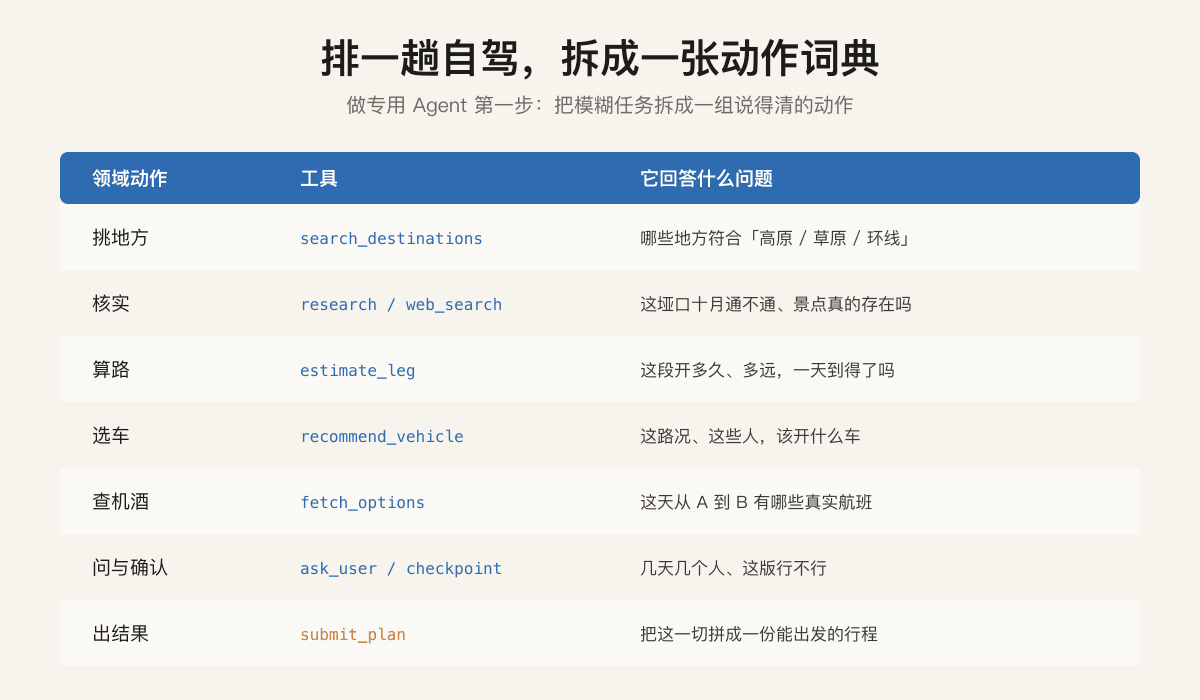
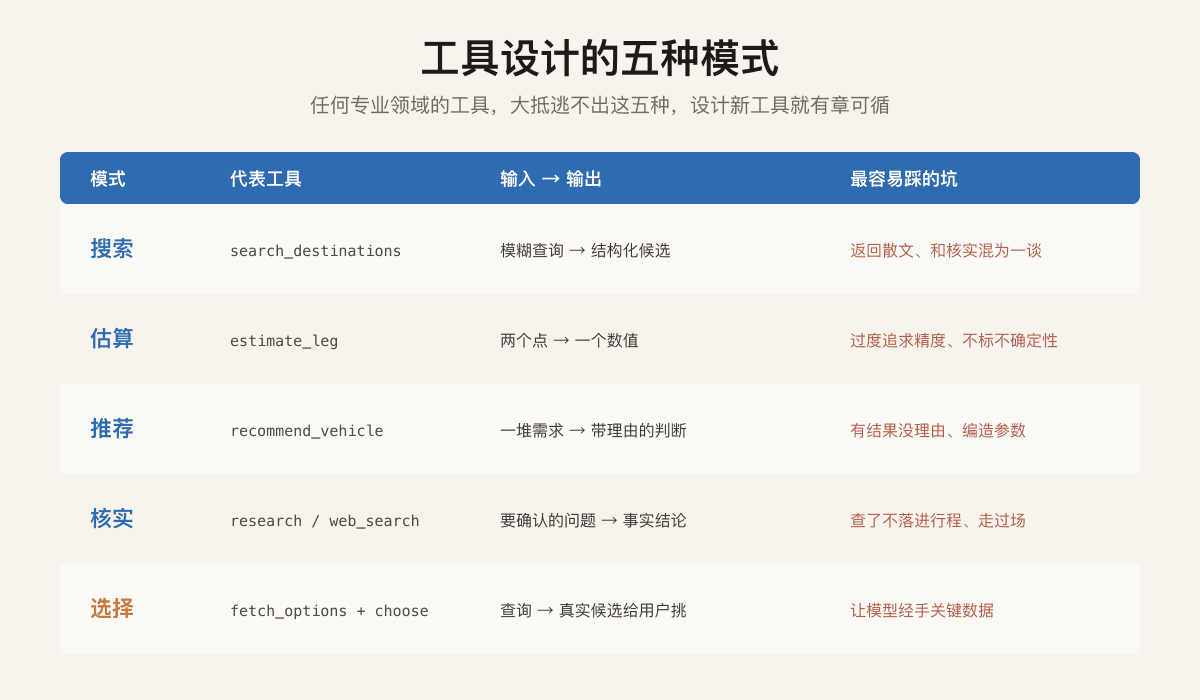
As the tools were removed a lot, I found one reassuring thing: they fell into five patterns over and over. Search, estimate, recommend, verify, select. Recognize these five, and design any new tool has rules to follow.
Search , such as sifting candidates by landform from the destination library. What it does is pick a set of candidates with structured attributes from a library you have saved yourself. The key point is to return attributes, not prose: giving the model "Daocheng Aden, altitude 4700, uniqueness 9" is a hundred times more useful than giving it "Daocheng Aden is a beautiful place", because the model needs to use these attributes to continue comparing and filtering.
Estimate , such as calculating the mileage and driving hours of a section of road. Its realization is cute and simple: two points straight line distance, multiplied by a detour factor of 1.35, and divided by a mountain road speed of 55 kilometers per hour. This is not accurate, and when it returns, it honestly marks it with the words "Daily Feasibility Judgment Only." But it is enough, because its purpose is to let the model judge whether "the day is too busy." It is estimated that it takes eleven hours a day, and the model knows that it should be divided into two days. A rough estimate is enough for this judgment, and there is no need to connect to an accurate routing API. Estimating tools are the easiest to over-design. As soon as they come up, they want to connect maps to calculate accurate routes. In fact, they only need to match accuracy. The truly accurate mileage is reserved until the final report is issued before making up.
Recommended , such as selecting a car based on road conditions, number of people, budget, and preferences. This is the heaviest of the five, because it hides true domain knowledge within. The car selection tool for Wild Travel Y is a self-built model library of 193 models. It translates "Sichuan-Tibet 318 Plateau Bad Road and Wading" into an off-road demand score, and then adds the number of people, budget, and nature of travel (with the elderly, avoid rough off-road) to calculate recommendations and reasons. The key point is that the output must come with a reason: "Recommend the match because seven seats are enough to seat, and the elderly are not comfortable." The reason makes the recommendation credible and allows users to dare to follow suit.
Verify , such as checking whether a pass is closed in October. Searching is picking from my database, and verifying is going to the outside world to confirm. It deals specifically with one thing: preventing model fabrication. The model "feels" that a certain attraction exists and a certain road can be passed, but it will remember wrongly, become outdated, or hallucinate. Verification tools force it to change "think" into "checked". In the description of this kind of tool, I wrote the sentence "If you check it or not write it, it means you didn't check it." The conclusions found must be processed and made visible to users.
Select , such as leaving the real flight as it is for the user to choose. Some decisions should not be made by the Agent for the user, such as which flight to choose and which hotel to stay in. Such tools identify real candidates and hand them over to the user for decision. There is an iron rule: the model is not allowed to touch key data throughout the entire process. The flight number and price remain in the code from check to landing. The model is only responsible for initiating inquiries and transparent display. Because once it is allowed to handle the price, it may easily change one and compile another.
There is another detail I want to talk about separately, the description of the tool. At first, I piled all the rules in a huge system prompt, searching for what to want, where to write, and checking each batch of points in parallel and not one by one. The number rose to seventy lines while writing, which was expensive and no one wanted to touch, and each round of dialogue had to feed these seventy lines back to the model. Later, I sank these rules into the descriptions of each tool, and the system prompt was thinner to more than twenty lines. Regarding the rules of web_search, the model only needs to see them when calculating whether to adjust web_search. Written in the tool description, the rules are in front of you the moment it selects this tool, which is close, saves money, and is cohesive. A good tool is self-documented. Models don't need to read a manual to use it. Just look at the name, description, and parameters.
Come back. Tools are the hands and feet of agents. Divide a professional field into an action dictionary, then recognize the five models of search, estimation, recommendation, verification, and selection, and design each tool well. What the Agent can do and how professional it is, is basically determined.
What is retrieved and calculated by each tool will eventually be stuffed into the context of the model so that it can make the next judgment. But the context is limited. If you plug too much, it will be expensive, slow, and confusing. The next article will talk about how to manage the business: what to put in, what not to put in, and how to press if it is too long.